I Tracked My Points in a Spreadsheet for Eight Years. Here’s Why I Finally Stopped.
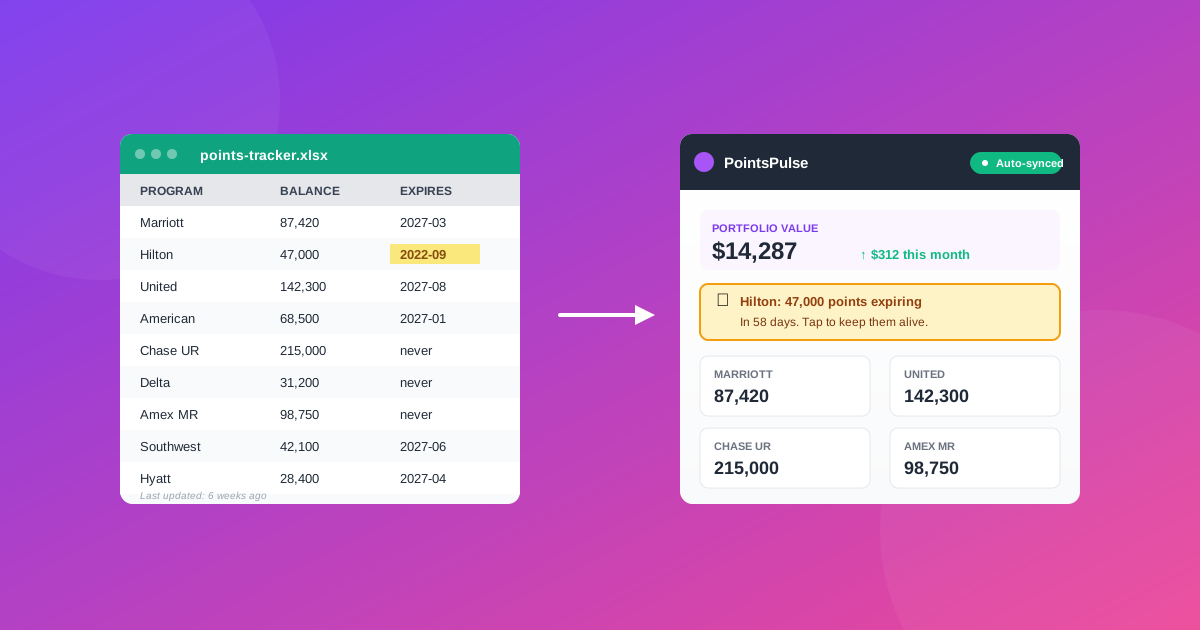
A working spreadsheet beats no system. But after eight years, mine started costing me more points than it saved.
For most of my points and miles life, my tracker was a Google Sheet.
One row per program. Columns for balance, last updated, expiration date, notes. A simple SUMIF at the bottom that converted everything to an estimated dollar value using my own (probably optimistic) point valuations.
It worked. For years. I want to make that clear before I tell you why I gave up on it, because if you’re tracking points in a spreadsheet right now, you’re doing something a lot of people in this hobby never bother to do at all. A working spreadsheet beats no system.
But somewhere around year six, the spreadsheet started costing me more points than it was saving me.
Where it broke down
Three specific failure modes, in the order they got me.
1. The “I’ll update it on Sunday” problem
I checked balances when I had a free minute. Sunday morning with coffee, usually. The problem with weekly check-ins is that loyalty programs don’t operate on your schedule. A Marriott category change announcement goes out on a Tuesday. A Hilton points expiration warning shows up in your inbox at 11pm on a Wednesday. By the time I sat down on Sunday, the news was old.
Not always actionable, but enough of the time that I noticed the pattern. The spreadsheet was a snapshot. The world was a video.
2. The “I missed an expiration” problem
This is the one that actually cost me money.
In 2022 I lost 47,000 Hilton points because my last activity had been longer ago than I realized. The spreadsheet had the expiration date in it. I had even highlighted the cell yellow. But I had not opened the spreadsheet for six weeks because I was busy with work, and Hilton’s reminder email went to the promotions folder.
The spreadsheet only works if you look at it. A tracker that pings you when something is about to expire works whether you remember to look or not.
3. The “I have too many programs now” problem
When I started tracking, I had four programs. By 2023 I had fifteen. Hotel programs, airline programs, credit card transferable points, niche ones like Wyndham and Choice that I joined for one specific redemption and then forgot about.
A spreadsheet handles 4 rows beautifully. It handles 15 rows fine if you stay disciplined. By the time you have 20+ programs across hotels, airlines, and three different transferable currencies, the maintenance overhead becomes a real chore. I started skipping updates. The data drifted out of sync with reality. The whole thing slowly stopped being useful.
Spreadsheet vs. tracker, side by side
Here’s how the two stacked up for me across the three failure modes:
| Failure mode | Spreadsheet | Real tracker |
|---|---|---|
| Knowing about program changes | You find out when you read travel blogs | Balance shifts show up automatically |
| Catching expirations | You only know if you remember to look | Email alert fires before it happens |
| Scaling beyond ~10 programs | Maintenance overhead grows linearly | Adding a program is a one-time setup |
| Privacy of credentials | Total. Your data, your sheet | Depends on the tool. Worth checking. |
| Historical view | Whatever you choose to log | Automatic history once set up |
| Cost | Free | Varies. Usually $30 to $50/yr |
The privacy row is the one most points people skip past, and it’s the one that matters most. More on that in a minute.
What I tried before building something
The obvious answer is AwardWallet. I tried it twice over the years.
Both times I stopped using it for the same reason: I did not want to give a third party my Marriott, Hilton, American Airlines, and Chase login credentials. Not because I think AwardWallet is malicious. I do not. But credentials stored on someone else’s server are credentials that could be exposed in a breach that has nothing to do with you. The history of the consumer software industry suggests this happens more often than anyone would like.
I am not trying to talk anyone out of using AwardWallet. Lots of smart people use it. But for me the trade was not worth it, and I never found another tool that solved the tracking problem without asking for my passwords. If you are weighing the options yourself, we later compared them in our roundup of the best AwardWallet alternatives.
So I built one.
What changed when I switched
The thing I did not expect about moving off a spreadsheet was how much mental space it freed up.
Tracking points in a spreadsheet is a small ongoing tax on attention. You think about it when you earn points. You think about it when you spend points. You think about it when you remember (or guiltily realize you have not been thinking about it). Even when the spreadsheet is fine, it is taking up a little bit of your brain.
When the balances just appear in a dashboard, updated automatically, and an email shows up two months before something expires, that mental tax goes away. I did not realize I was paying it until I stopped.
The second thing I did not expect was the historical view. Spreadsheets are point-in-time. Even if you log balances weekly, you usually overwrite the cell rather than keep a history. Seeing a graph of my Marriott balance over the last six months told me things about my own behavior (and Marriott’s devaluations) that I would never have noticed in a sheet.
What you should do, no matter what tool you use
A few things I would tell my 2018 self, separate from any product recommendation:
Track everything in one place. Whether that is a spreadsheet, a notes app, a tracker, or a wall of sticky notes. The single biggest mistake people make is having balances scattered across the program apps themselves, with no consolidated view. You cannot make good redemption decisions without seeing all of it at once.
Set expiration reminders that fire, not reminders that sit. A cell highlighted yellow does not save you. A calendar alert two months before each expiration date does. Email alerts do too, if you trust the source.
Re-evaluate every two years. Whatever system you used in 2022 may not be the right system in 2026. I went from 4 programs to 15+ before I really felt the system breaking. Re-check periodically whether the tool still fits the volume.
Pick a tool that matches your privacy comfort. Some people are fine handing over credentials. Some are not. There is no correct answer. Just be deliberate about which side of that line you are on, and pick accordingly.
If your spreadsheet is working for you, keep it. Genuinely. I am not here to tell you to switch.
But if you have hit any of the three failure modes I described, and you are not comfortable sharing your passwords with a third party, that is the exact gap we built PointsPulse to fill. Chrome extension, balances read locally while you are logged in, no credentials stored anywhere.
Read more about how it works or see the pricing if you want to skip ahead.
Either way, do not lose another 47,000 points to a forgotten expiration date.
Stop tracking points in a spreadsheet
PointsPulse is a privacy-first Chrome extension. Start for free, no credit card required.
Try PointsPulse free